
Event rentals · WooCommerce + Stripe
Take event rental security deposits without charging them months in advance.
SecureHold adds Stripe pre-authorization holds to WooCommerce, so you can collect the rental payment now and place the security deposit hold closer to delivery or the event date. Release it after return, or capture all or part of the authorized amount when needed.
In one paragraph
What is an event rental security deposit hold?
An event rental security deposit hold is a temporary card authorization used separately from the rental payment. SecureHold adds this workflow to WooCommerce through Stripe, so the deposit can be authorized closer to the event instead of being charged at booking.
Event rental vocabulary
Four different amounts. Four different purposes.
Event rental quotes often mix several money mechanisms in one order. SecureHold is concerned with exactly one of them.
Reservation deposit
Advance payment used to secure the booking.
Rental balance
The actual amount due for the rental.
Damage waiver
A separate fee or contractual mechanism that may cover defined risks depending on the rental terms.
Security deposit
A refundable amount used as financial security, returned or released when no capture is required.
What SecureHold handlesDamage waivers, insurance and security deposits solve different problems. Their exact scope depends on the rental agreement and coverage terms. SecureHold manages the security deposit hold workflow in WooCommerce and nothing else.
The event rental calendar
The problem isn't only the deposit. It's when you place it.
A wedding booked in March for an event in August leaves months between the order and the moment the equipment is actually at risk. A Stripe authorization created at booking would expire long before the event. The authorization window starts when the hold is created, not when the event starts.
The hold covers the short period around the event, not the whole booking period. Authorization windows vary by card network and transaction type.
Same wedding order, two mechanisms
Charged deposit vs. event-timed pre-authorization
Charged refundable deposit
Today- The deposit amount is actually charged
- The customer pays it months before the event
- A refund is required after the return
- Every refund has to be tracked per order
- Original processing fees are not returned with the refund, according to Stripe's applicable rules
SecureHold pre-authorization, timed around the event
With SecureHold- The deposit is not transferred unless it is captured
- The hold can be created closer to delivery or event timing
- Release the hold after the return
- Capture up to the authorized amount if required
- The authorization window is time-limited
Authorization windows vary by card network and transaction context.
While a hold is open, the customer's available balance is still reduced by the authorized amount.
Booking to return
How an event rental runs with SecureHold
-
01March
Booking
The customer books the event rental in WooCommerce.
-
02March → August
Payment
The rental payment or balance is collected according to your normal WooCommerce workflow.
-
03Days before
Hold
The security deposit hold is created closer to delivery or the event.
-
04Event day
Event
Equipment is delivered and used.
-
05After
Return & inspection
Items are collected, counted and inspected.
-
06
Release or capture
Release the full hold if everything comes back correctly.Capture part or all of the authorized amount when necessary.
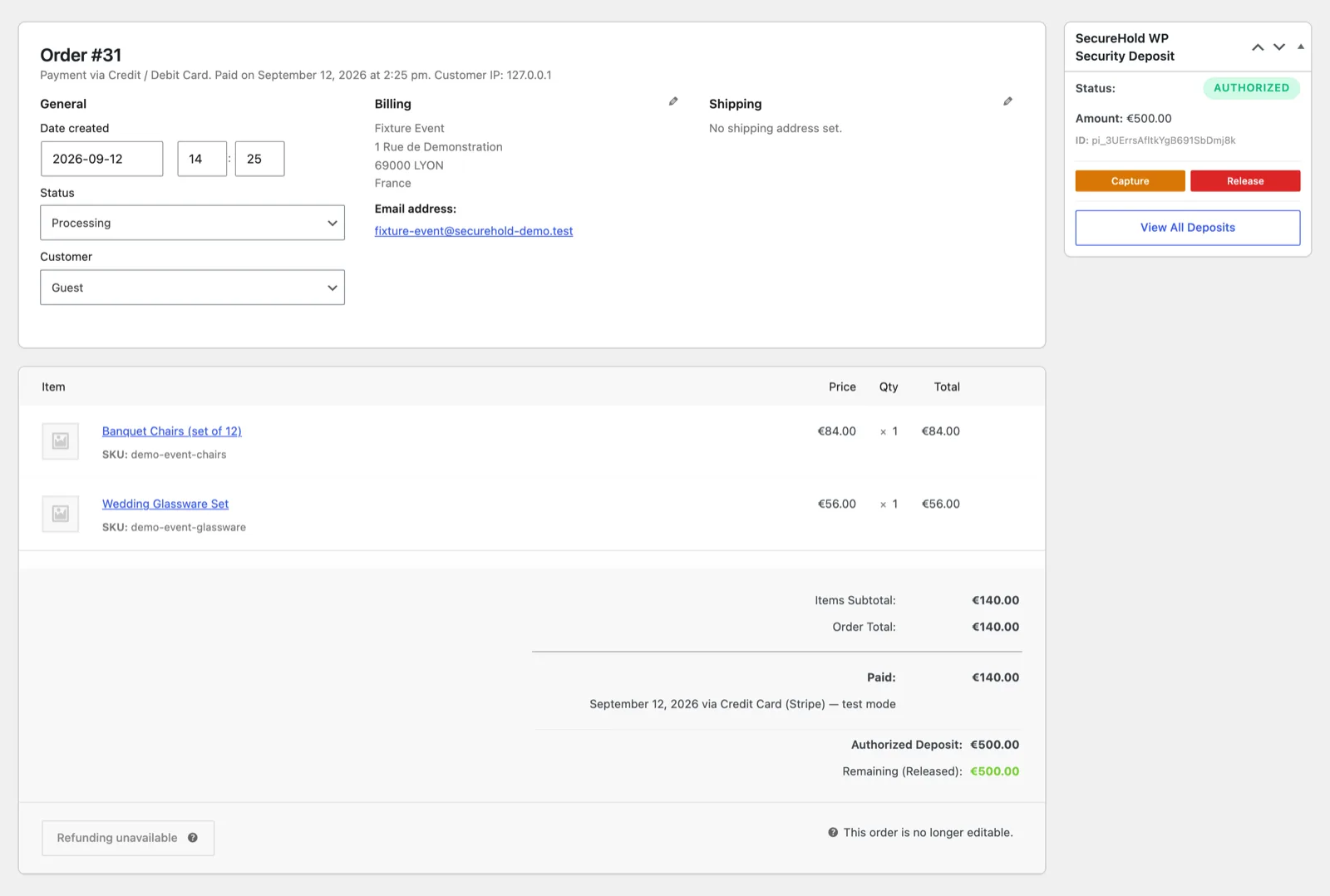
The SecureHold panel on a WooCommerce event order, showing hold status, amount, and the Capture and Release actions. Demonstration data only.
Missing items
One missing item shouldn't mean keeping the whole deposit.
Illustrative amounts, shown to explain how a partial capture splits an authorized hold.
SecureHold supports partial capture up to the authorized amount. When part of the hold is captured, the remaining amount is released.
On a 120-chair order, a handful of missing items rarely justifies the full deposit. Counting the return and capturing only what the shortfall represents keeps the rest of the authorized amount with the customer.
Partial capture is a payment operation, not an automatic right to charge. Whether a charge is contractually justified depends on your rental agreement and applicable rules.
Read this first
Before you install: what an event rental hold can and can't do
A pre-authorization is a finite mechanism with a network-defined lifetime. In event rentals, that lifetime is the part worth planning around.
Authorization windows are limited
Online card authorization windows are time-limited and commonly fall within a range of several days depending on the card network and transaction type. SecureHold cannot extend network-defined authorization windows.
Plan the return and inspection inside the window.
Timing matters
An event booked months ahead should not rely on an Immediate hold created at booking if that authorization will expire before the event.
For those orders, create the hold manually a few days before delivery, or configure Delayed, Scheduled or By-Status creation in Pro so it lands near the event date.
Requirements
- WordPress
- WooCommerce
- WooCommerce Stripe Gateway
- Stripe account
Test your workflow in Stripe Test Mode before going live.
Event rental
Built for real event rental workflows
Wedding & event furniture
Tables, chairs, lounge furniture and reception inventory.
Catering & glassware
Glassware, tableware, serving equipment and reception items.
Decor, props & ceremony items
Arches, signage, props, decor and ceremony inventory.
Event lighting & AV
Lighting, speakers and audiovisual equipment for events.
Photobooths & reception equipment
Photobooths and other equipment supplied specifically for events.
And other short-duration event inventory normally protected by a refundable security deposit.
Tents and structures can follow the same deposit workflow. If most of your inventory is AV, DJ or production equipment rented outside events, the equipment rental page covers that scenario in more detail.
Equipment rental depositsFree and Pro
What you get
Book now. Place the hold when it actually makes sense.
Everything needed to run a deposit hold on an event order, including manual hold creation when the event is still far off.
- Stripe security deposit holds
- Full or partial capture
- Manual hold creation when needed
- One-click release
- Automatic release
- Global deposit amount
- Deposits list and status tracking
- My Deposits customer view
- Checkout deposit message
- Customer and admin notifications
- Stripe test mode
- HPOS ready
In event rentals, the main Pro argument is timing. Pro decides when the hold is created, and lets a mixed order carry different deposit rules per item.
Fictional example amounts, shown to illustrate per-product and per-category rules.
- Delayed hold creation
- Scheduled hold creation
- By-Status hold creation
- Product-level deposit rules
- Category-level deposit rules
- Rule simulation
- Extended logs and diagnostics
- Email branding
Delayed, Scheduled and By-Status are hold creation strategies, not capture strategies.
Hold creation strategies
Booked months ahead? Create the hold closer to the event.
SecureHold offers three ways to decide when the authorization is created. Which one fits depends on how far ahead you take bookings.
Immediate
FreeThe hold is created at order time, together with the WooCommerce order.
Best only when the event is close enough to fit inside the authorization window.
Manual
FreeYou create the hold yourself from the order, a few days before delivery or the event.
Works at any booking lead time, as long as someone remembers to do it.
Scheduled / By-Status / Delayed
ProConfiguration depends on the data available in the order, so test it before production.
Scheduled creation reads a date stored on the WooCommerce order. Event rental and booking plugins store dates differently, so verify what your setup writes to the order and test the result in Stripe Test Mode.
Before you commit
See the workflow before you install
Everything about the deposit workflow can be inspected first: watch it run, read the plugin listing, or reproduce it yourself in Stripe Test Mode.
The full authorize, capture and release flow on a WooCommerce order. Watch the demo.
We don't have an event rental case study to show yet, and we'd rather say so than invent one. As general product feedback, SecureHold has a 5-star WordPress.org review from a camera rental store: a different vertical, but the same deposit workflow. Reviews on WordPress.org.
FAQ
Event rental security deposit questions
Test the full event workflow before your next booking
Use Stripe Test Mode to run the whole sequence on your own store, on a mixed event order, before anything reaches a real customer.
- 01Create a WooCommerce order
- 02Create or schedule the deposit hold
- 03See the hold appear
- 04Test a partial capture
- 05Test a full release
- 06Confirm the workflow fits your business
Free plan available Stripe test mode included Support
SecureHold WP is an independent WooCommerce extension that uses the Stripe API. Not affiliated with, certified by or endorsed by Stripe, Inc. or Automattic Inc. Authorization windows are defined by the card networks and payment method, not by SecureHold. Whether you may charge a customer for damage, loss or missing items depends on your rental agreement and the rules that apply to your business. All amounts on this page are illustrative and are not recommendations.