
Hotels & guesthouses · WooCommerce + Stripe
Take the room payment now. Place the security hold closer to check-in.
SecureHold adds Stripe security deposit holds to WooCommerce direct bookings, so you can collect the stay payment normally and create the deposit hold closer to check-in. Release it after checkout, or capture up to the authorized amount when needed.
In one paragraph
What is a hotel security deposit hold?
A hotel security deposit hold is a temporary card authorization used separately from the room payment. SecureHold adds this workflow to WooCommerce direct bookings through Stripe, so the deposit can be authorized closer to check-in instead of being charged at booking.
Before you go further
Does this fit your setup?
Good fit
- Direct bookings through WooCommerce
- Short stays
- WooCommerce Stripe Gateway
- Security deposit workflow
- Check-in date stored in the WooCommerce order or related booking data
- Manual or scheduled hold creation
Not the right fit
- OTA bookings that never become WooCommerce orders
- Front desk terminal-only workflows
- Hotels using a PMS without WooCommerce
- Long stays outside the authorization window
- Businesses looking for full incidental folio management
Two different mechanisms
Security deposit or incidental hold? They are not the same thing.
Security deposit
A defined refundable amount used as financial security for the stay.
What SecureHold handlesIncidental hold
A hotel authorization often used to cover future extras or variable charges during the stay.
SecureHold is designed for the security deposit workflow. It does not manage a hotel folio or increment an authorization as new charges are posted.
The booking calendar
The booking can happen months ahead. The hold shouldn't.
A guesthouse stay booked in March for a check-in in August leaves months between the order and the moment the hold actually needs to be active. A hold created at booking would expire long before arrival. The authorization window starts when the hold is created, not when the guest checks in.
The hold covers the short period around check-in and the stay, not the whole booking period. Authorization windows vary by card network and transaction type.
Booking to checkout
How a short stay runs with SecureHold
-
01
Booking
Guest books directly through WooCommerce.
-
02
Room payment
The stay payment is handled through the normal WooCommerce checkout workflow.
-
03
Hold creation
The security deposit hold is created close to check-in, manually or with a supported timing strategy.
-
04
Check-in
Guest arrives.
-
05
Stay
The security deposit hold remains active during the short stay.
-
06
Checkout
The guest leaves and the property is reviewed.
-
07
Release or capture
Release if no capture is needed.Capture up to the authorized amount where contractually justified.
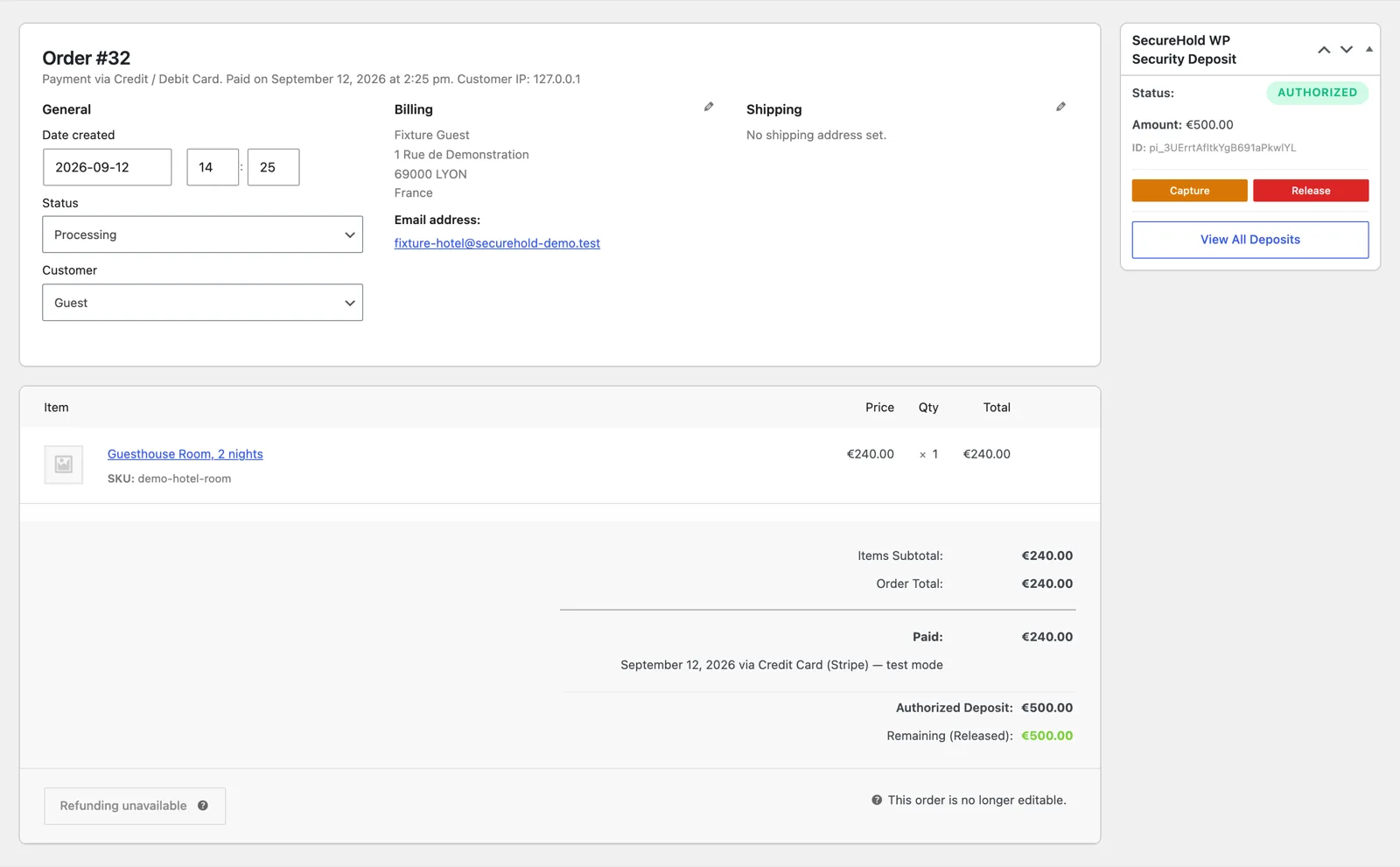
The SecureHold panel on a WooCommerce booking order, showing hold status, amount, and the Capture and Release actions. Demonstration data only.
Stay length
Best suited to short stays that fit inside the authorization window
Authorization windows vary by card network and transaction type. The longer the stay, the less margin you have between hold creation and expiry.
Read this first
A security deposit hold, not a hotel management system
SecureHold does
- Create security deposit holds on WooCommerce orders
- Release holds
- Capture up to the authorized amount
- Support partial capture
- Show deposit status
- Support manual hold creation
- Support scheduled / delayed / by-status timing in Pro
- Work with Stripe Test Mode
SecureHold does not
- Replace your PMS
- Replace your booking engine
- Manage OTA reservations that never enter WooCommerce
- Manage a hotel folio
- Post minibar or room-service charges
- Increment authorizations during the stay
- Provide a front desk card-present terminal workflow
- Extend Stripe authorization windows
Hotels & guesthouses
Built for small accommodation businesses using WooCommerce
Guesthouses
Independently run guesthouses taking direct bookings.
B&Bs
Bed and breakfasts managing their own reservations.
Boutique hotels
Small, independently branded properties.
Inns & small hotels
Independent inns and small hotels outside chain systems.
Serviced accommodation
Short-stay serviced units booked directly online.
Designed for direct WooCommerce bookings where a short-stay security deposit makes operational sense.
Free and Pro
Free does the hold. Pro decides when it happens.
Use Free when you are happy to create the hold manually. Use Pro when you want the hold timing to follow your booking workflow.
Everything needed to run a security deposit hold on a short-stay booking.
- Stripe security deposit holds
- Manual hold creation
- Full or partial capture
- One-click release
- Automatic release
- Deposit status tracking
- My Deposits customer view
- Checkout deposit message
- Customer and admin notifications
- Stripe test mode
- HPOS ready
In short-stay bookings, the main Pro argument is timing. Pro decides when the hold is created relative to check-in, instead of relying on someone to do it manually every time.
- Scheduled hold creation
- By-Status hold creation
- Delayed hold creation
- Product / category deposit rules
- Rule simulator
- Logs and diagnostics
- Email branding
Hold creation strategies
Create the hold when the stay actually needs it
SecureHold offers several ways to decide when the authorization is created. Which one fits depends on how far ahead you take bookings.
Immediate
FreeHold created when the order is placed.
Only suitable when the stay is already close enough to fit inside the authorization window.
Manual
FreeCreate the hold manually shortly before check-in.
Works at any booking lead time, as long as someone remembers to do it.
Scheduled
ProHold created relative to a relevant stored date.
Configuration depends on the data available in the order.
By-Status / Delayed
ProUse a WooCommerce order status or a configured delay to decide when the hold is created.
Test the status or delay against your own order flow.
Timing depends on the data stored in your WooCommerce order and booking setup. Test it before going live.
FAQ
Hotel security deposit questions
Test the short-stay workflow before you go live
Use Stripe Test Mode to simulate the whole sequence on your own store, on a short-stay booking, before anything reaches a real guest.
- 01Create a WooCommerce booking / order
- 02Create the security deposit hold close to check-in
- 03See the hold appear
- 04Test a release
- 05Test a partial or full capture
- 06Confirm the timing fits the stay
Free plan available Stripe test mode included Support
SecureHold WP is an independent WooCommerce extension that uses the Stripe API. Not affiliated with, certified by or endorsed by Stripe, Inc. or Automattic Inc. Authorization windows are defined by the card networks and payment method, not by SecureHold. SecureHold does not replace a PMS, booking engine or front desk terminal workflow. Whether you may charge a guest for damage or a policy violation depends on your booking terms and the rules that apply to your business. All amounts on this page are illustrative and are not recommendations.