
Equipment rentals · WooCommerce + Stripe
Take a security deposit for equipment rentals. Without charging your customer.
SecureHold places a Stripe pre-authorization on the deposit amount in WooCommerce, separately from the rental payment. Release it when the equipment comes back, or capture up to the authorized amount when needed.
In one paragraph
What is a security deposit hold?
A security deposit hold, also called a card hold or pre-authorization, reserves funds on a customer's card without transferring them to the merchant. SecureHold adds this workflow to WooCommerce through Stripe, separately from the rental payment.
The friction today
Charging the deposit creates friction for everyone
A refundable deposit taken as a real charge means the customer pays €950 for a €150 rental, and your team carries the refund afterwards.
The customer is debited for the rental and the deposit
Both amounts leave their account at checkout. For an €800 deposit on a €150 rental, most of what they pay is money they expect to get back.
You have to issue and track the refund
Every returned item becomes a second operation to perform, follow up on and answer questions about while the customer waits for it to settle.
Processing fees on the original payment are not returned with the refund
Under the Stripe rules that apply, refunding a charged deposit does not return the processing fees from the original payment. See Stripe's documentation on refunded payments.
Same rental, two mechanisms
Charged deposit vs. Stripe pre-authorization
Charged refundable deposit
Today- The deposit amount is actually charged
- A refund is required after the return
- The customer waits for the refund to settle
- Original payment processing fees are not returned with the refund
Stripe pre-authorization with SecureHold
With SecureHold- Deposit funds are temporarily reserved
- No deposit amount is transferred unless captured
- Release the hold after a successful return
- Capture up to the authorized amount if needed
- Authorization windows are time-limited
Authorization windows vary by card network and transaction type.
The customer's available balance is still reduced by the reserved amount while the hold is open.
Four steps
How a rental runs with SecureHold
-
01
Order
The customer rents the equipment through WooCommerce and pays the rental fee.
-
02
Hold
SecureHold creates a Stripe pre-authorization for the security deposit amount.
-
03
Return
The equipment comes back. The merchant reviews the return.
-
04
Release or capture
Two paths from the same order screen:
Release the hold after a successful return.Capture all or part of the authorized amount when required.
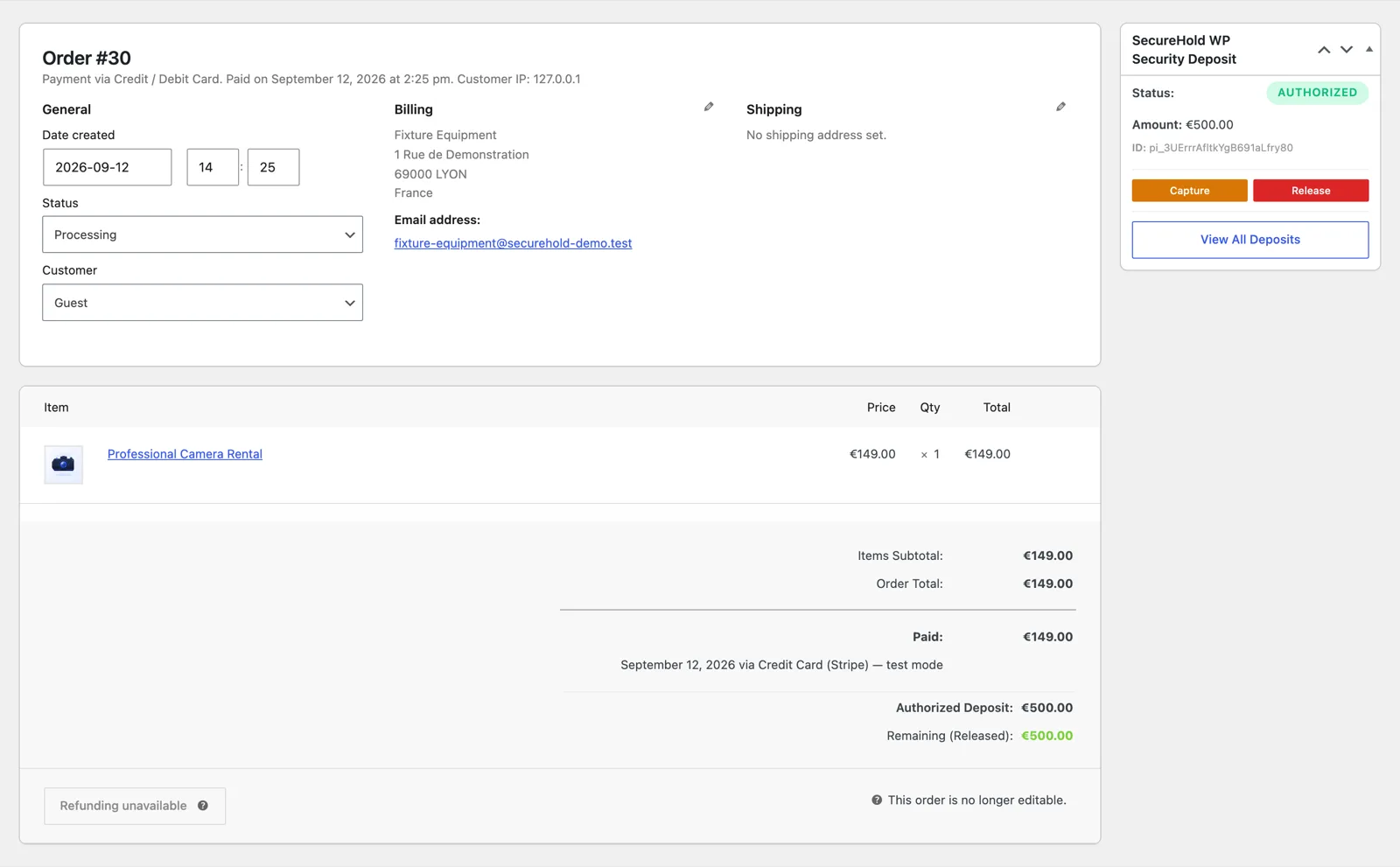
The SecureHold panel on a WooCommerce order, showing hold status, amount, and the Capture and Release actions. Demonstration data only.
Read this first
Before you install: what a hold can and can't do
A pre-authorization is a finite, single-capture mechanism. Knowing its edges up front is what makes it dependable in a rental workflow.
Authorization windows are limited
Online card authorization windows are time-limited and vary by card network and transaction type. Stripe documents common windows of around 5 to 7 days for major card networks. SecureHold cannot extend these network-defined windows.
Plan to capture or release before the authorization expires.
One SecureHold capture per hold
SecureHold supports one capture per hold. If only part of the authorized amount is captured, the remaining amount is released.
In practice, that means deciding the final amount once, after the equipment has been inspected, rather than capturing in several instalments.
Requirements
- WordPress
- WooCommerce
- WooCommerce Stripe Gateway
- Stripe account
Test your configuration in Stripe test mode before putting it in production.
Equipment rental
Built for the way equipment rentals actually work
Camera & video
Cameras, lenses, drones and production gear.
Audio, DJ & lighting
Speakers, mixers, lighting rigs and AV equipment.
Event & party equipment
Furniture, tents, decoration and event inventory.
Tools & jobsite equipment
Professional tools and short-term equipment rentals.
Bikes, skis & outdoor gear
Bikes, skis, camping and outdoor rental equipment.
And other physical equipment you'd normally ask a security deposit for.
Free and Pro
What you get
Everything needed to run a deposit hold on a rental order.
- Stripe security deposit holds
- Full or partial capture
- One-click release
- Automatic release after a configurable number of days
- Fixed or percentage deposit amount
- Deposits list and status tracking
- My Deposits customer view
- Checkout deposit message
- Customer and admin notifications
- Stripe test mode
- HPOS ready
Different equipment can require different deposit amounts. Pro resolves the right amount per product or category, without your team remembering it.
Fictional example amounts, shown to illustrate per-product rules.
- Different deposit rules by product
- Different deposit rules by category
- Delayed / Scheduled / By-Status timing
- Rule simulation
- Extended logs and diagnostic tools
- Email branding
WordPress.org review
From a camera rental store
5 out of 5“I needed a simple way to authorize a deposit for camera rentals.”
FAQ
Equipment rental deposit questions
Try it on a test order first
You can reproduce the whole security deposit workflow in Stripe test mode, on your own store, before anything goes into production.
- 01Place a WooCommerce test order
- 02Create the security deposit hold
- 03See it appear in SecureHold
- 04Test a release
- 05Test a capture
- 06Decide whether the workflow fits the business
Free plan available Stripe test mode included Support
SecureHold WP is an independent WooCommerce extension that uses the Stripe API. Not affiliated with, certified by or endorsed by Stripe, Inc. or Automattic Inc. Authorization windows are defined by the card networks and payment method, not by SecureHold. Whether you may charge a customer for damage or loss depends on your rental agreement and the rules that apply to your business.