
Car rentals · WooCommerce + Stripe
Different vehicles. Different security deposits. Held instead of charged upfront.
SecureHold adds Stripe security deposit holds to WooCommerce car rental orders, so you can charge the rental normally and pre-authorize the vehicle deposit separately. Set different deposit rules for different vehicles, create the hold closer to pickup, then release or capture from the WooCommerce order.
In one paragraph
What is a car rental security deposit hold?
A car rental security deposit hold is a temporary card authorization used separately from the rental payment. SecureHold adds this workflow to WooCommerce car rental orders through Stripe, so the vehicle deposit can be reserved on the card without being completed as a payment upfront.
The hold still reduces the customer's available credit or available funds while it remains active.
Before you go further
Does this fit your rental model?
Good fit
- WooCommerce-based bookings
- Short rentals
- Small or independent fleets
- Contactless or delivery workflows
- Online security deposit collection
- Different deposit amounts by vehicle
- Hold created close to pickup
Not the right fit
- Counter-only, card-present workflows
- Long-term rentals
- Campervan or motorhome rentals with long durations
- Businesses requiring full fleet management
- Businesses expecting licence or driver identity verification
- OTA or booking flows that never enter WooCommerce
- Businesses needing a full rental management system
Three different things
Security deposit, excess and CDW are not the same thing
Security deposit
A refundable amount reserved as financial security for the rental.
What SecureHold handlesExcess / deductible
The amount defined by the rental agreement that may remain payable under certain damage or insurance conditions. SecureHold does not determine it.
CDW / damage waiver
A contractual product or waiver that can change the renter's liability according to its terms. SecureHold does not provide insurance or coverage.
SecureHold manages the technical card hold. It does not determine insurance coverage, liability, damage entitlement or the terms of the rental agreement.
Two different workflows
At the counter or online? These are different workflows.
Traditional rental counter
- Physical card
- Driver present
- Licence checked
- Contract signed
- Deposit authorized at pickup
- Often a card-present terminal workflow
SecureHold
- WooCommerce order
- Online Stripe payment method
- Card-not-present workflow
- Deposit created from the WooCommerce order
- Better suited to contactless or digitally managed rentals
SecureHold does not replace a card-present rental counter workflow. It is designed for WooCommerce-based online deposit holds.
The booking calendar
The booking can happen months ahead. The deposit hold shouldn't.
A rental booked in June for a pickup in August leaves months between the order and the moment the hold actually needs to be active. A hold created at booking would expire long before pickup. The authorization window starts when the hold is created.
The hold covers the short period around pickup and return, not the whole booking period. Amounts and dates are illustrative.
The main commercial argument
One fleet. Different vehicles. Different deposit rules.
With SecureHold Pro, product and category rules can assign different security deposit amounts to different vehicles or vehicle groups.
Booking to return
How a short car rental runs with SecureHold
-
01
Booking
Customer books through WooCommerce.
-
02
Rental payment
The rental fee is handled through the normal WooCommerce checkout.
-
03
Hold creation
The security deposit hold is created close to pickup.
-
04
Pickup
The vehicle is handed over according to the rental company's normal process.
-
05
Rental
The hold remains active during the short rental.
-
06
Return & inspection
The vehicle returns and the merchant performs their normal inspection.
-
07
Release or capture
Release if no capture is needed.Capture up to the authorized amount where justified under the rental agreement.
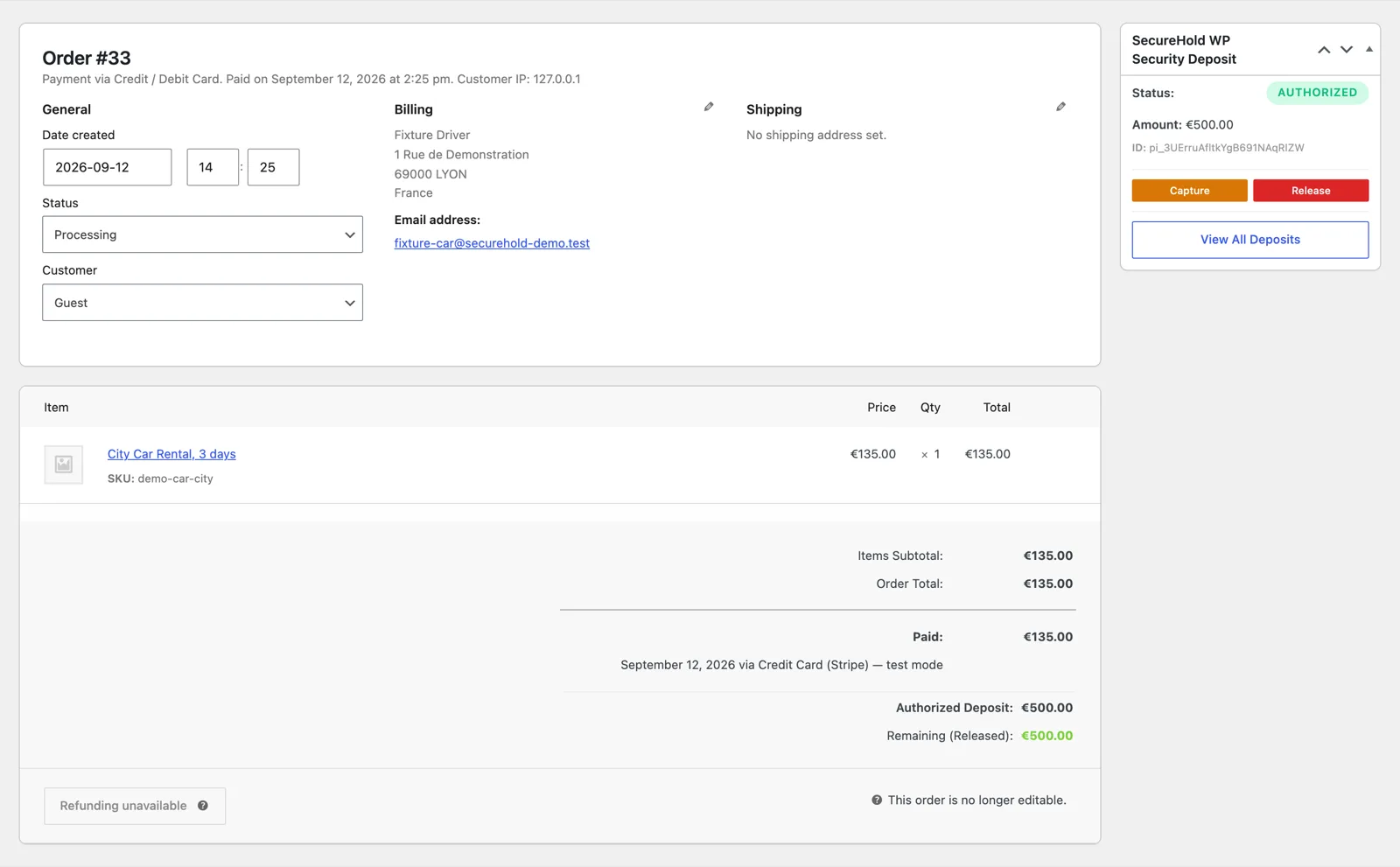
The SecureHold panel on a WooCommerce car rental order, showing hold status, amount, and the Capture and Release actions. Demonstration data only.
Rental length
Best suited to short rentals that fit inside the authorization window
Authorization windows vary by card network and transaction type. A hold created later in an off-session workflow may have a shorter available window than a hold created while the customer is actively present online.
Free and Pro
Free handles the hold. Pro adapts it to your fleet.
Use Free when a single deposit rule and manual timing are enough. Use Pro when different vehicles need different deposit rules, or hold timing needs to follow your booking workflow.
Everything needed to run a security deposit hold on a short car rental order.
- Stripe security deposit holds
- Manual hold creation
- Full or partial capture
- One-click release
- Automatic release
- Deposit tracking
- My Deposits customer view
- Checkout deposit message
- Customer and admin notifications
- Stripe test mode
- HPOS ready
For a fleet, the main Pro argument is deposit segmentation. Different deposits for different vehicles, and the hold created at the right stage of the rental workflow.
- Product-level deposit rules
- Category-level deposit rules
- By-Status hold creation
- Scheduled hold creation
- Delayed hold creation
- Rule simulator
- Logs and diagnostics
- Email branding
FAQ
Car rental security deposit questions
Test the full car rental workflow before you use it with a real vehicle
Use Stripe Test Mode to simulate the whole sequence on your own store, on a short car rental order, before anything reaches a real customer.
- 01Create a WooCommerce rental order
- 02Choose or create the correct deposit rule
- 03Create the hold close to pickup
- 04See the hold appear
- 05Test a release
- 06Test a partial capture
- 07Confirm the timing fits the rental duration
Free plan available Stripe test mode included Support
SecureHold WP is an independent WooCommerce extension that uses the Stripe API. Not affiliated with, certified by or endorsed by Stripe, Inc. or Automattic Inc. Authorization windows are defined by the card networks and payment method, not by SecureHold. A card hold reduces the customer's available credit or available funds while it is active. SecureHold does not provide insurance, determine excess or CDW liability, manage rental contracts or driver verification, or replace a rental management system or a card-present counter terminal. Whether you may capture a charge for damage or a policy violation depends on your rental agreement and the rules that apply to your business. All amounts on this page are illustrative and are not recommendations.